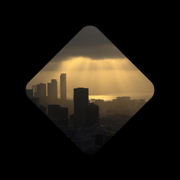
Rotation Camera
The picture stays level.
Turn your phone any way you like and the picture stays level. Its shape follows the turn: tall when you hold the phone upright, square at an angle, wide when it's sideways.
Taking pictures
- Tap the window for a photo. Hold it for a video.
- The volume buttons and Camera Control work too: press for a photo, hold for a video.
- Your shots are saved to Photos. The little stack under the window is your recent ones; tap it to look back through them.
From the Lock Screen
On an iPhone with Camera Control, you can make Rotation Camera the camera it opens: Settings > Camera > Camera Control. You can also add its control to your Lock Screen or Control Center. Shots taken from the Lock Screen show up in the app the next time you open it.
QR codes
Point the window at a QR code and it turns round, with the link underneath. Tap it to open the link.
Questions, bugs, ideas
Write to contact@azlen.me. I read everything.